
The Tool-Calling Interface
Context Boundaries and Statelessness
Large language models are inherently stateless and execute no computation outside their own network layers. When an agent system uses a tool—such as performing a database query, fetching a URL, or executing a calculation—the model does not run the tool directly. Instead, the interaction is structured as a coordinated round trip between the stateless model and the stateful execution environment.
This division of labor preserves security boundaries and control:
- Reasoning (Stateless): The model reads the conversation history and a description of available tools (schemas). It decides which action to take next and returns a structured instruction.
- Action (Stateful): The application hosting the model parses this structured instruction, executes the corresponding code in its local environment, and returns the result back to the model.
The boundary between these two systems is defined by the tool-calling schema.
Schema Definition and Parameter Expose
To enable tool selection, the application must pass a list of schema signatures to the completions API. These schemas define the name, purpose, and required parameters of each function using JSON Schema formatting. The model uses these definitions to format its output arguments.
For example, if an agent has access to a payment calculator tool, the schema must specify the exact data types and bounds for input values:
{ "type": "function", "function": { "name": "calculate_loan_payment", "description": "Calculate the monthly payment for a loan.", "parameters": { "type": "object", "properties": { "principal": {"type": "number", "description": "The loan amount"}, "rate": {"type": "number", "description": "Annual interest rate as a decimal (e.g., 0.05)"}, "years": {"type": "integer", "description": "Term of the loan in years"} }, "required": ["principal", "rate", "years"] } } }
If the parameters are underspecified or incorrect, the execution environment will fail when parsing the values. If the schema is unclear, the model may hallucinate missing parameters or format them incorrectly.
The Execution Cycle
The diagram below details the tool-calling loop:
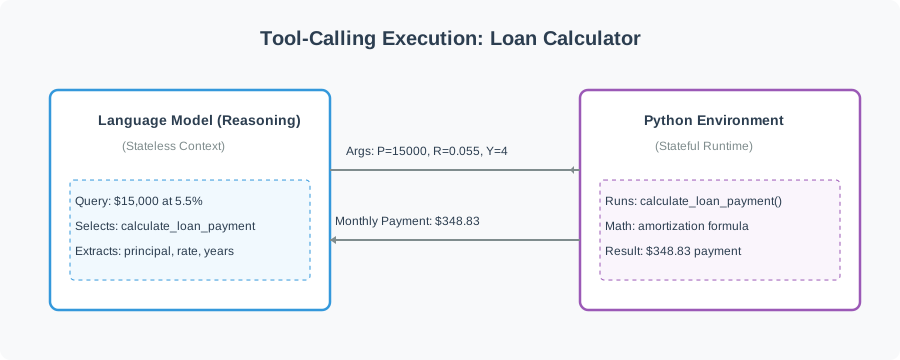

- Request Generation: The model evaluates the user query against the tool schemas. If it requires external data, it suspends text generation and outputs a structured
tool_callsrequest containing the function name and a JSON-encoded string of arguments. - Native Execution: The hosting application intercepts the response, parses the arguments, executes the native function, and captures the return value as a string.
- Context Resumption: The application appends the tool results to the conversation history as a new message with the role
tooland queries the completions API again. The model consumes this updated history to produce the final answer.
Interactive Playground: Tool Schema Matching
In the interactive playground below, we define a calculation tool and pass its schema to the language model. When run, the model analyzes the loan calculation request, outputs the formatted JSON arguments, executes the local Python function, and returns the final calculated answer.
Notice how the model does not attempt to calculate the math directly, which would be prone to arithmetic errors. Instead, it extracts the parameters from the user's natural language input, maps them to the structured JSON schema, and requests a calculation tool call. The application performs the floating-point math and feeds the result back, enabling the model to deliver a verified, accurate answer.